If your attacker can delete it, it was never a backup.
Code Spaces found that out on June 17, 2014. The company hosted source code repositories for developers and had been in business for seven years. Its website advertised a full recovery plan that has been proven to work. Then a DDoS arrived, and underneath it, something quieter. An attacker had reached the company’s AWS control panel and left extortion notes inside it.
The servers were never breached. The attacker never had the private keys. The database was never stolen. The backups were one login away.
Code Spaces changed its passwords. The attacker had already created backup logins, and once the lockout was noticed, the deleting started: EBS snapshots, S3 buckets, machine images, instances. Over a 12-hour period, most of the data, the backups and even the offsite backups were partly or fully gone. The company shut down. Production and its safety net lived behind the same door, so one stolen key opened both.
Did the industry learn?
The attackers did. Veeam’s 2024 Ransomware Trends Report surveyed 1,200 IT leaders whose organizations had been hit. In 96 percent of attacks, the criminals went after the backup repositories. In 76 percent, they got to them. Veeam sells backup software and its own vault, so read that survey as a vendor’s view. CISA does not sell a vault, and its #StopRansomware guide says the same thing in different words: keep offline, encrypted backups, because many ransomware variants hunt for accessible backups to delete or encrypt.
Look at that last word. Accessible. If your admin credentials can reach it, so can the attacker’s.
Fine, so keep a copy somewhere else. Isn’t that 3-2-1?
Not quite. In May 2024, UniSuper, an Australian pension fund with 647,000 members, lost its entire Google Cloud account, backups included. No attacker was involved. A misconfiguration during provisioning ended with the deletion of the fund’s private cloud subscription. The fund ran in two geographies, and the deletion took both. Downtime began May 2. Full restoration came on May 15. UniSuper recovered because it also held backups with a different provider.
That is the lesson, and it is narrower than “keep more copies.” One copy in a different failure domain > three copies behind one login.
So what does a copy that survives this look like?
It has three properties, and each one stops a different enemy.
It cannot be changed, which beats the attacker holding stolen admin credentials, because time is on your side. It cannot be changed by one person, which beats the insider or the phished admin, because a second human has to agree. It cannot be reached all the time, which beats the attacker scanning your network, because there is nothing to find until a door opens on purpose.
Cohesity FortKnox is one product built around exactly those three. It is a SaaS vault run by Cohesity, and it sits on top of a self-managed Cohesity DataProtect cluster. It is an add-on, not a replacement for your backups. Your cluster sends a copy into a Cohesity-managed cloud vault through a configurable transfer window. The vault runs on AWS or Azure, and since February 2026 on Google Cloud too, isolated from your own cloud account.
Time: the data is locked with WORM, which stands for write once, read many, using S3 Object Lock on AWS and immutable storage for Azure Blob. People: critical actions, including recoveries, need quorum, meaning a minimum of two people approve. Network: access uses short-lived tokens, and the connection is dynamic, which is what Cohesity means by “virtual air gap.”
There are two tiers. On Azure, the warm vault recovers immediately and carries a 30-day minimum retention. The cold vault is cheaper, recovers slower, and carries 90 days. Because the lock is real, a retention number you pick today is a number you live with. When you do recover, you can restore to the original location or elsewhere, including public cloud, and you can pull back specific files or objects without restoring a whole volume.
How would you build one?
Cohesity has not published how FortKnox works inside, so what follows is my design, not theirs. It rests on one rule. Do not trust your code to hold the line. Do not trust your admins to hold the line. Do not trust your network to hold the line. Give each of those jobs to something that cannot be talked out of it.
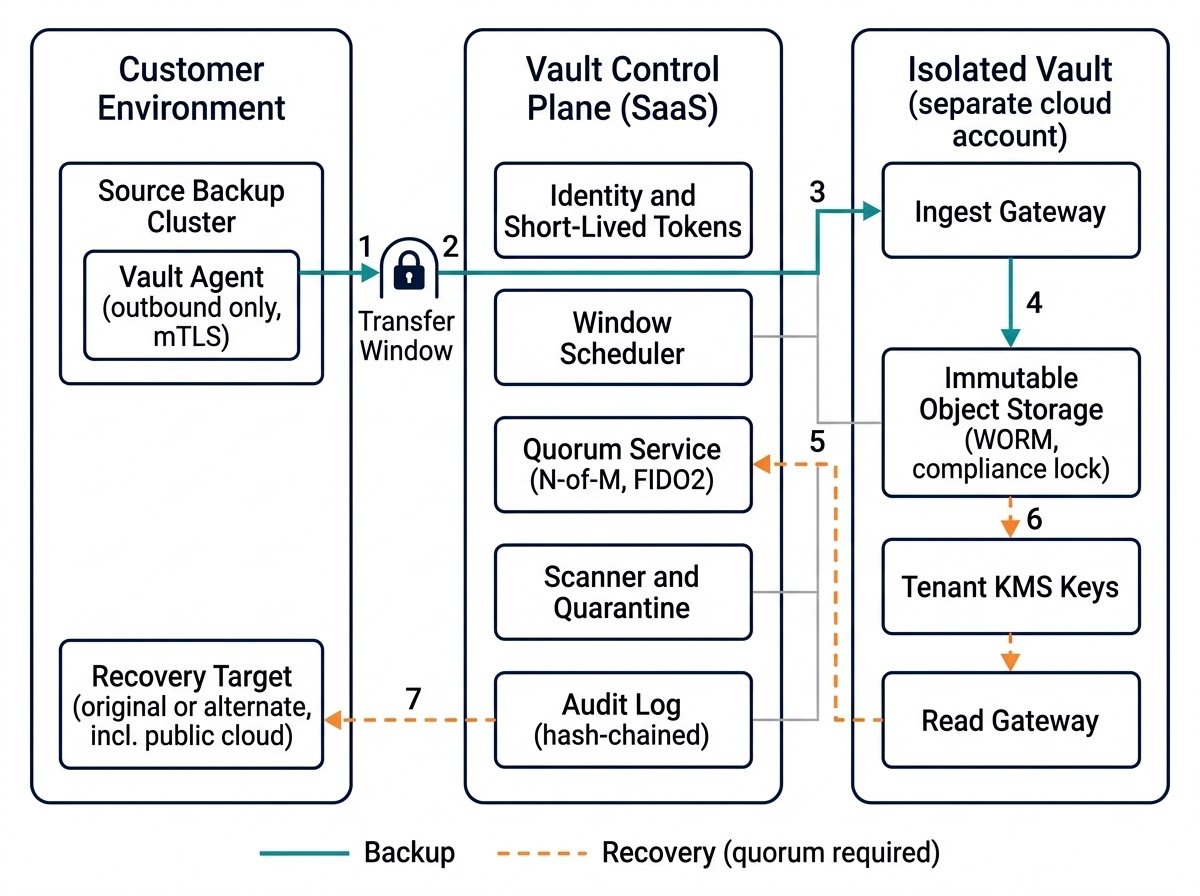
Start with time. Do not enforce it in your own code. Your code has bugs, your code has admins, and one day your code will be the thing the attacker owns. Push the lock down into the storage layer, where the cloud provider enforces it. All three big clouds have a version. With S3 Object Lock in compliance mode, no user, not even root, can delete or overwrite a protected version, and the retention period can be extended but never shortened. Azure’s locked time-based retention policy cannot be shortened or deleted, and it can be extended up to five times. Google’s bucket lock is irreversible: you can raise the retention, never lower it.
Then make the dangerous operation impossible to write. In my design, the storage interface has no delete method at all.
type VaultStore interface {
    Put(ctx context.Context, key string, r io.Reader, until time.Time) (Version, error)
    Get(ctx context.Context, key string, v Version) (io.ReadCloser, error)
    ExtendRetention(ctx context.Context, key string, v Version, until time.Time) error
}
You cannot call a function that does not exist. Neither can an attacker who steals your service. One detail from the S3 docs: Object Lock needs versioning, and writing to the same key again creates a new, unlocked version. So never overwrite. Use unique, content-addressed keys and treat every write as final. One gap too: the Azure page I read says nothing about deleting the container itself while blobs are under retention. Test that in a throwaway account before you depend on it.
What is the delete button you forgot?
The S3 documentation says the only way to delete a compliance-mode object before its retention date is to delete the AWS account. Read that twice. The lock is perfect and the container around it is not. AWS does close accounts into a 90-day suspended state before the remaining resources are deleted, but that is a recovery window you have to ask Support to use, not a safeguard you can plan around. This is UniSuper again, from the other side. UniSuper lost a subscription. You can lose an account. So protect the account the way you protect the data.
{
  "Effect": "Deny",
  "Action": [
    "organizations:CloseAccount",
    "organizations:LeaveOrganization",
    "kms:ScheduleKeyDeletion",
    "kms:DisableKey"
  ],
  "Resource": "*"
}
The action names in this policy are for context purposes only. Attach it as a service control policy to the vault accounts. SCPs do not apply to the organization’s management account, so harden that one by hand.
The key lines matter more than they look. AWS KMS makes a key unusable the moment you schedule its deletion, then destroys it after a waiting period of 7 to 30 days. You can cancel in between. So an attacker with that permission does not destroy your data on day one. They make it unreadable on day one, in the middle of your recovery, and destroy it on day seven at the earliest. The data is intact. You still cannot read it, and your outage clock keeps running.
Doesn’t quorum just mean two people click a button?
Only if the button is not bound to anything. Here is the attack. Alice requests a recovery to a test environment. Bob approves. Before it executes, the request is swapped for a recovery to a destination the attacker controls. Both approvals are real. The action is not what they approved.
The fix is to approve a hash, not a request. Canonicalize the action: its type, tenant, target, parameters, requester, a nonce and an expiry. Hash it. Each approver signs the hash with a hardware security key, using WebAuthn. The executor recomputes the hash from what it is about to run, and refuses on any mismatch.
action = canonical_json({type, tenant, target, params,
                         requested_by, nonce, expires_at})
digest = sha256(action)
approvers sign digest      # WebAuthn, challenge = digest
executor: sha256(action_about_to_run) == digest, or refuse
The policy service counts N distinct signers on registered keys, none of them the requester, all before the expiry. Then the read gateway verifies the signatures a second time, against pinned public keys. The private keys never leave the approvers’ hands, so a compromised policy service can skip a check but cannot forge a signature. The second verifier catches the skip. Cohesity describes quorum as two or more people approving critical actions. How it binds an approval to the exact action is not public, so the hash is how I would do it.
Two more rules. Changing the approver list needs quorum and a cooling-off delay, say 48 hours, because otherwise an attacker simply adds themselves. And show approvers what they are approving in plain words, especially the recovery destination. An approval screen nobody reads is a rubber stamp.
What does a door that opens on purpose look like in code?
Four layers, and all of them fail closed.
The first is the network. The ingest endpoint exists only while a window is open. A scheduler attaches the gateway to a load balancer, or opens a firewall rule for the customer’s source addresses, then closes it on a timer. Windows have to be renewed, so a crashed scheduler leaves the door shut.
The second is identity. The window issues a token that lasts minutes, scoped to one tenant and to writing only. Bind it to the client’s certificate, as RFC 8705 describes, and a stolen token is useless from any other machine, because that machine cannot prove it holds the matching private key.
The third is storage. The ingest role can put objects and do nothing else. No deletes, no lock changes, no lifecycle changes.
The fourth is limits. Cap the bytes and objects per window, and watch the change rate and entropy of what arrives. A night of mass encryption looks nothing like a normal night of backups. Locked objects cannot be edited, so keep each scan verdict in a separate metadata database, not on the object.
Opening a window off schedule should need quorum, and every open should alert the customer.
Is it a real air gap?
No. A tape in a drawer has no network path. A virtual air gap has a very small one, on purpose. The trust did not disappear. It moved, from your backup admin to the vendor’s control plane and to the people on your approval list.
That move has failure modes you should know before you sign anything. Quorum is only as strong as its approvers. Put both of them behind the same identity provider as everything else, and two approvers become one person wearing two hats. The transfer window works in both directions: it is also the window in which poisoned data can ride into the vault, and immutability will lock whatever you sent. Veeam’s own survey found that only 37 percent of organizations used a quarantine or sandbox during recovery. And recovery speed is set by your link and your restore target, not by the vault.
Go back to the first line. If your attacker can delete it, it was never a backup. Ask what a stolen admin password cannot delete in your setup. Then ask the same about your cloud account and your encryption key. If the answer is nothing, you have copies. You do not have a backup.
- List every place your backups live, then mark which ones your production admin credentials can reach.
- Count failure domains, not copies.
- Enforce immutability in storage and IAM, never in application code, and give your own services no delete permission.
- Treat the cloud account and the encryption key as delete paths, and deny both at the organization level.
- Bind every approval to a hash of the exact action, and keep approvers on separate identity paths.
- Scan before you restore, then time a restore into a non-production target on a schedule.
October 11, 2026